
UTM Parameters: Stop Guessing Where Your Website Traffic Comes From
"Where did that lead come from?"
It's a question we hear constantly. A client gets a phone call, a form submission, a new customer, and they have no idea which marketing effort deserves the credit. Was it the Instagram post? The email newsletter? That feature in the local press?
Google Analytics tries to answer this, but without proper tracking in place, it often gets it wrong. Traffic from your Google Business Profile might show up as "organic search." Clicks from your email campaigns might appear as "direct." And that referral link your partner shared? Probably lumped into a catch-all bucket that tells you nothing useful.
The fix is simple: UTM parameters.
What UTM parameters actually are
UTM stands for Urchin Tracking Module, a reference to the analytics software Google acquired in 2005. The name stuck, even though Urchin itself is long gone.
UTM parameters are short text codes added to the end of a URL that send campaign data to Google Analytics. When someone clicks a link with UTM parameters attached, Google Analytics reads those codes and records where that visitor came from.
A normal URL looks like this:
https://yourwebsite.com/contact
A UTM-tagged URL looks like this:
https://yourwebsite.com/contact?utm_source=instagram&utm_medium=social&utm_campaign=spring-promo
Everything after the question mark tells Google Analytics the story. The visitor clicked a link on Instagram, through a social post, as part of your spring promo campaign. That data shows up in your acquisition reports, giving you a clear picture of what drove the visit.
The key point: UTM parameters go on the links you share, not on your website. Your website doesn't need any additional code. You simply use tagged URLs whenever you're sending people to your site from somewhere else.
The five UTM parameters
Google Analytics recognizes five UTM parameters. Three are required for proper tracking. Two are optional and add more detail when you need it.
utm_source identifies the specific referrer sending traffic to your site. This might be "facebook" for a social post, "mailchimp" for an email campaign, or "partner-blog" for a link from another website.
utm_medium describes the type of channel, not the specific platform. Common values include "email," "social," "cpc" (cost-per-click), and "referral." Keeping medium values consistent helps Google Analytics sort your traffic into the correct default channel groups.
utm_campaign names your specific marketing initiative. You might use "year-end-giving" for your December fundraising push or "product-launch" for a new offering. This parameter groups all traffic from a single initiative, even when visitors arrive from multiple sources and mediums.
utm_content helps when you have multiple links pointing to the same destination. If your email has both a header button and a footer link going to the same page, you can tag one as "header-cta" and the other as "footer-link." Useful for A/B testing different creative elements.
utm_term was originally designed for paid search campaigns to track keywords that triggered an ad. Less common now that platforms like Google Ads use auto-tagging, but still helpful when you want to manually track specific keyword performance.
Where to use UTM parameters (beyond paid ads)
Most people associate UTMs with paid advertising, and yes, any ad campaign should absolutely use them. But if you're not running ads, there are still several places where UTM tracking makes a real difference.
Google Business Profile
Your GBP listing likely drives significant traffic to your website, but without UTMs, Google Analytics often misattributes those visits. Adding a simple UTM to your website link in GBP lets you see exactly how much traffic your listing generates.
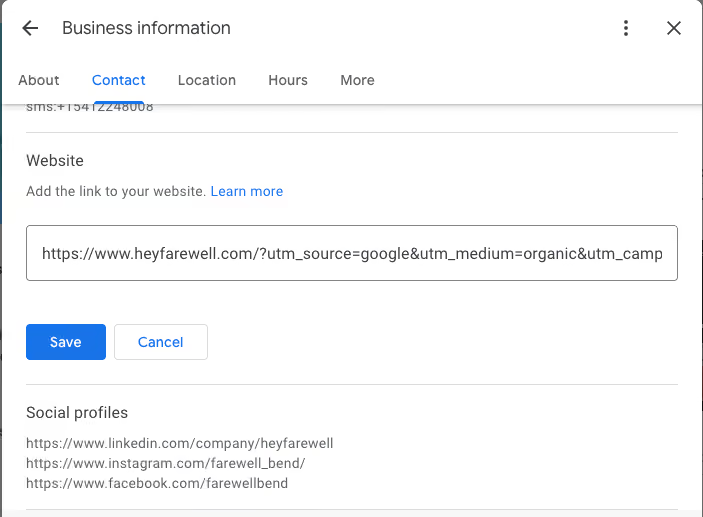
Campaign URL Builder fields:
Website URL: https://yourwebsite.com
Campaign source: google
Campaign medium: organic
Campaign name: gbp-listing
Generated URL:https://yourwebsite.com?utm_source=google&utm_medium=organic&utm_campaign=gbp-listing
Email marketing
Every link in your newsletters, drip campaigns, and promotional emails should include UTMs. Without them, email traffic frequently shows up as "direct" in your analytics, which means you're undervaluing one of your most effective channels.
Campaign URL Builder fields:
Website URL: https://yourwebsite.com/spring-sale
Campaign source: mailchimp
Campaign medium: email
Campaign name: spring-newsletter-2026
Campaign content: header-button
Generated URL:https://yourwebsite.com/spring-sale?utm_source=mailchimp&utm_medium=email&utm_campaign=spring-newsletter-2026&utm_content=header-button
Social media posts
Organic posts on LinkedIn, Facebook, Instagram, and other platforms benefit from UTM tracking. This helps you understand which platforms and which types of content drive the most engaged traffic.
Campaign URL Builder fields:
Website URL: https://yourwebsite.com/blog/new-post
Campaign source: linkedin
Campaign medium: social
Campaign name: blog-promotion
Generated URL:https://yourwebsite.com/blog/new-post?utm_source=linkedin&utm_medium=social&utm_campaign=blog-promotion
QR codes and print materials
If you're using QR codes on print materials, business cards, signage, or packaging, UTMs let you track how many people actually scan them. This connects your offline marketing to measurable online results.
Campaign URL Builder fields:
Website URL: https://yourwebsite.com/menu
Campaign source: qr-code
Campaign medium: print
Campaign name: table-tent-jan-2026
Generated URL:https://yourwebsite.com/menu?utm_source=qr-code&utm_medium=print&utm_campaign=table-tent-jan-2026
Press mentions and partner links
When your business is featured in an article or a partner shares a link to your site, request that they use a UTM-tagged URL. This gives you visibility into referral traffic that might otherwise be difficult to track.
Campaign URL Builder fields:
Website URL: https://yourwebsite.com
Campaign source: industry-blog
Campaign medium: referral
Campaign name: guest-post-jan-2026
Generated URL:https://yourwebsite.com?utm_source=industry-blog&utm_medium=referral&utm_campaign=guest-post-jan-2026
How to build UTM links
Creating UTM-tagged URLs follows a consistent pattern. Once you understand the structure, the process becomes straightforward.
Start with your destination URL
Decide where you want visitors to land. This is your base URL before any parameters.
Add your parameters
The structure follows this pattern: start with your destination URL, add a question mark, then list each parameter with its value. Separate multiple parameters with ampersands.
https://yoursite.com/event?utm_source=instagram&utm_medium=social&utm_campaign=gala-2026
If your URL already contains a question mark for existing parameters, use an ampersand instead to begin your UTM string.
Use a URL builder tool
You don't have to construct UTM links by hand. Google offers a free Campaign URL Builder that generates properly formatted links. Enter your destination URL and parameter values, and the tool outputs a complete tagged URL.
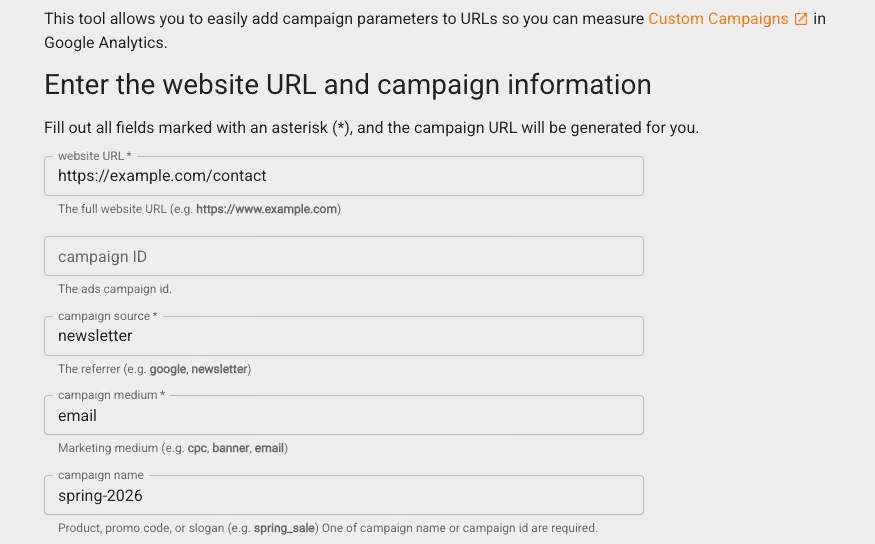
For teams running multiple campaigns, spreadsheet-based UTM builders help manage links at scale and enforce naming conventions.
Test before you launch
Click your finished link and verify two things: the page loads correctly, and the visit appears in GA4's Realtime report. Catching errors before your campaign goes live saves you from losing tracking data.
UTM naming conventions that keep your data clean
A clear naming system prevents messy data and confusion as your campaigns grow.
Use lowercase for everything. UTM parameters are case-sensitive. "Facebook" and "facebook" create separate entries in your reports. Standardizing on lowercase eliminates this fragmentation.
Keep values short and descriptive. Choose names that teammates can understand months later. "spring-newsletter-2026" works better than "sn26" or "campaign-47."
Avoid spaces and special characters. Spaces become "%20" in URLs and can break tracking. Use hyphens or underscores instead. Stick to alphanumeric characters.
Document your conventions. Maintain a shared spreadsheet listing approved values for source, medium, and campaign names. When multiple people create links, this document keeps everyone consistent.
Common UTM mistakes to avoid
Inconsistent capitalization creates duplicate entries that split your data across multiple rows.
Using UTM tags on internal links overwrites the original source data and corrupts attribution. Reserve UTM parameters for external campaigns only.
Forgetting required parameters means links missing utm_source and utm_medium may not track properly.
Not testing links before launch wastes campaign spend and loses tracking data.
What this looks like in practice
Once you've been using UTMs consistently for a few weeks, your Google Analytics acquisition reports start telling a much clearer story.
Instead of seeing a vague breakdown like Direct: 45%, Organic Search: 40%, Referral: 15%, you might see: Organic Search (Google): 30%, Google Business Profile: 18%, Email Newsletter: 15%, Direct: 12%, Instagram (organic): 10%, LinkedIn (organic): 8%, Partner Referral (Industry Blog): 7%.
That second view lets you make actual decisions. You can see that your GBP listing is more valuable than you thought. You can justify the time you spend on LinkedIn. You can measure whether that guest post was worth the effort.
Finding your UTM data in GA4
After tagging your links, you'll want to see the results. GA4 stores UTM data in specific reports and dimensions.
Navigate to Reports > Acquisition > Traffic acquisition to see your UTM data. This report displays session source, medium, and campaign information alongside metrics like users, sessions, and conversions. You can add secondary dimensions to drill deeper, combining source/medium with campaign, for example.
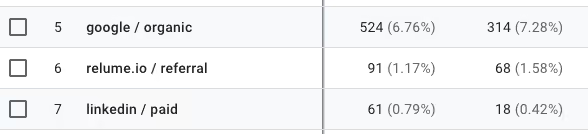
For custom analysis, GA4's Explorations feature lets you build reports that combine UTM dimensions with specific conversion metrics. This requires more setup but connects campaign data directly to the outcomes you care about.
Getting started
If you're already working with us on your website, we can help you set up a UTM strategy that makes sense for your business. This includes configuring your Google Business Profile with proper tracking, creating a UTM naming convention document for your team, and setting up Google Analytics views that make the data easy to interpret.
For businesses ready to add paid advertising to the mix, we partner with Logical Position, a team that specializes in paid media strategy and management. They handle UTM implementation as part of their ad setup, ensuring your paid traffic is tracked accurately from day one.
Interested in getting your tracking set up, or want to explore whether paid advertising makes sense for your business? Book a call and we'll point you in the right direction.